


October 28, 2026
|
5 min read


.png)
Blazingly fast way to build, track and deploy your models!
MintMCP is a hosted gateway for governing how AI agents connect to tools through the Model Context Protocol (MCP) — authentication, tool-level access control, policy rules, and an activity log sit in front of every connector. We spent several weeks testing it hands-on: connector setup, bundling, OAuth flows, governance policies, and a full load-testing pass covering latency, throughput, and failure behavior — then cross-checked everything against MintMCP’s own public documentation and ran the same evaluation against TrueFoundry’s MCP Gateway using a consistent set of criteria. This review is written from that work, completed in September–October 2026, so treat anything MintMCP has shipped after that date as outside its scope.
We’ve tagged claims below the way we tested them: Verified (we reproduced it ourselves, hands-on), Documented (stated in the vendor’s own public docs but not independently reproduced), or flagged as an open question where the evidence was genuinely inconclusive. Where a number comes with a methodology caveat in our own testing, we’ve kept that caveat attached rather than quoting it as a clean benchmark.
Worth stating plainly before anything else: this review — and the hands-on testing behind it — covers MintMCP’s MCP (tool) Gateway: the layer that governs how an agent calls a connected tool like Tavily, AWS, GitHub, or Slack. It does not cover LLM/model routing, because none was tested and because MintMCP doesn’t appear to position the product that way. MintMCP’s own content explicitly separates itself from “model-routing gateways [that] primarily handle LLM traffic,” positioning its MCP Gateway and Agent Gateway around governed tool access instead. Several controls that sound like general spend or safety controls — token budgets, request-rate limits, an org-wide monthly cap — are documented as living in a separate product for AI model traffic, not in the MCP tool-connection gateway this review tested. If tool-call-specific rate limiting or budgeting is a requirement for you, neither MintMCP nor (per the same documentation review) TrueFoundry’s MCP Gateway currently has a dedicated, confirmed control for it — that’s a parity gap worth knowing about on both sides, not a MintMCP-specific one.
MintMCP runs as a single hosted layer — the customer never operates infrastructure themselves. Every connector you add can be used standalone or grouped into what MintMCP calls a Virtual MCP, a bundle of several tools exposed as one endpoint. Access is governed at the organization level: there’s no native project, workspace, or environment object, so separating “staging” from “production” or one team from another means creating multiple Virtual MCPs and naming them by convention.
What stood out as genuinely strong in hands-on testing:
Best for: teams that want a hosted, relatively simple way to govern MCP tool access without standing up infrastructure, and who can live with a flat, org-wide tenancy model and Enterprise-gated policy tooling.
TrueFoundry’s MCP Gateway is part of a broader control plane that also handles LLM routing and model serving, and its documentation describes three internally separated layers — a control plane, a compute plane, and a gateway plane — with dedicated network segmentation between them, a more explicit architectural claim than MintMCP states anywhere in its own materials. (Documented from TrueFoundry’s own docs; this is a difference in how explicitly each vendor describes its internals, not an independently verified security comparison.)
A few areas where our testing found a genuine, confirmed TrueFoundry advantage:
Best for: teams that want MCP governance in the same control plane as LLM routing and model deployment, and that need finer-grained tenancy or tool-call-specific policy enforcement than a flat, org-wide model provides.
Both platforms share a structural limitation worth knowing regardless of vendor: neither offers traditional load balancing across multiple copies of the same tool server, because MCP’s modern transport is stateful — spreading one conversation across multiple server instances would break session continuity. This is a consequence of the protocol, not a missing feature on either side.
Most “gateway X vs. gateway Y” performance content is vendor-claimed numbers repeated without a methodology. We ran a controlled, hands-on benchmark suite against MintMCP’s MCP gateway instead — a paired latency test, a concurrency ramp to failure, cold-start measurements, and a heavy-load timeout check — and we’re publishing the methodology alongside the numbers so it can be checked rather than taken on faith.
Scope note: every figure below reflects client-side measurement against MintMCP’s hosted SaaS gateway, from a single origin machine, over a single testing window — not a guarantee of production throughput at a different scale, location, or connector. These numbers are also specific to the connectors tested (Tavily, AWS Knowledge) — a different downstream tool with different response sizes or latency characteristics could behave differently through the same gateway. We tested two ways: a paired, interleaved comparison (every query run through the gateway and direct against the origin API, back-to-back, call order alternated to cancel out ordering bias) for latency, and a concurrency ramp (c=50 through c=400, ~90,000+ total requests via the hey load-testing tool) for throughput and failure behavior.
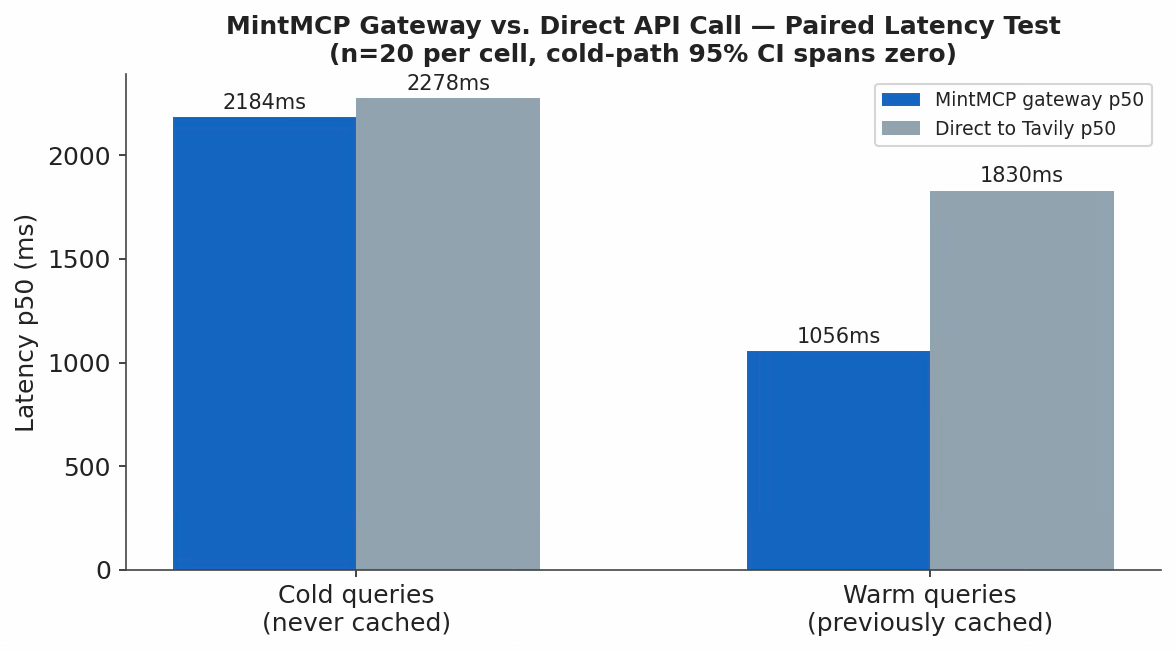
1. Does MintMCP add latency vs. calling the tool directly? Not measurably, on fresh requests.
On the cold path — the one that actually isolates gateway overhead from caching — the mean delta was +94ms with a 95% confidence interval of [−357, +545]. The interval spans zero: no statistically detectable latency overhead on a query the gateway hasn’t seen before. The warm-path speed advantage is a caching effect, not a gateway-performance advantage. (Confidence: Verified, hands-on, n=20 per cell, October 2026.)
2. A real, reproducible idle-connection penalty. Gateway calls made shortly (~0.25s) after a prior call showed a median of 2116ms, while calls made after a longer gap (~4.5s) showed a median of 3279ms — roughly 1.1 seconds slower after even a short idle period. Direct-to-origin calls showed no equivalent pattern. The likely cause: MintMCP’s upstream connection pool or worker processes go cold after a few seconds of inactivity. This matters most for bursty or low-volume agent traffic. (Confidence: Verified, hands-on, October 2026.)
3. Throughput and behavior at saturation.
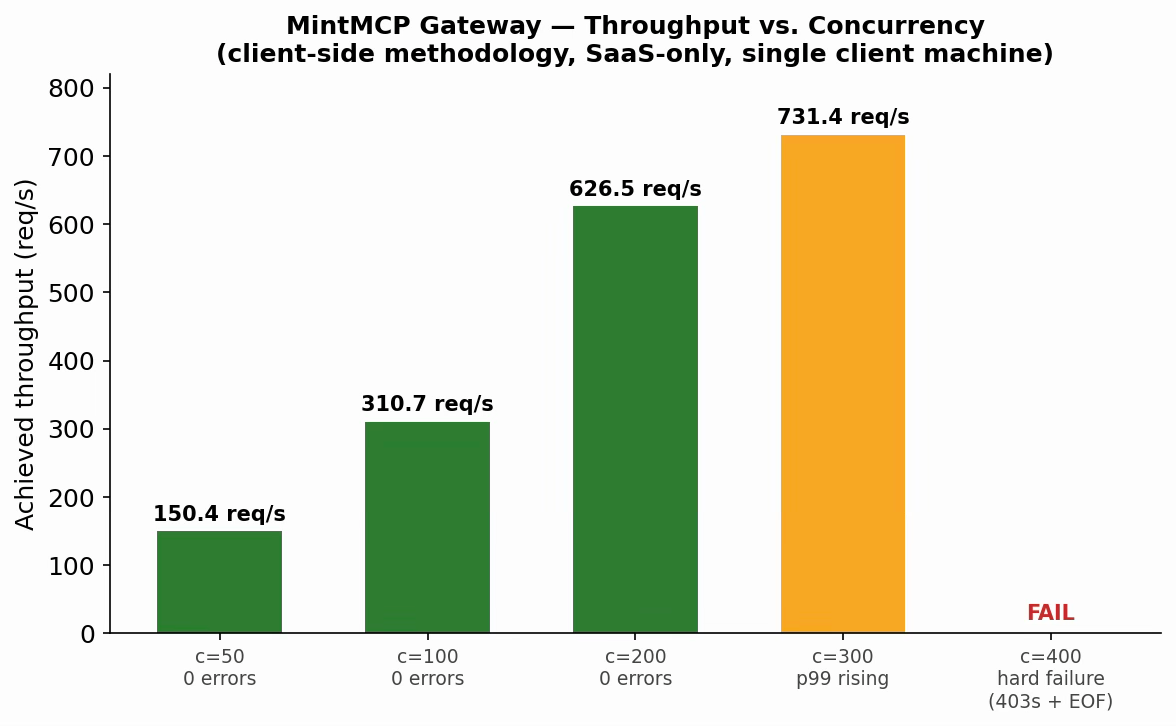
Observed ceiling: ~200 concurrent connections before meaningful degradation, from one client machine against MintMCP’s shared SaaS tenant. This is what one responsibly-scoped client observed, not a platform-wide capacity limit. (Confidence: Verified, hands-on, ~90,000+ total requests, September 2026.)
4. First-call vs. steady-state cost. First call took 0.653s against a steady-state average of 0.408s — a modest, real cold-start cost, separate from the idle-penalty finding above. (Confidence: Verified, hands-on, September 2026.)
5. Behavior under heavy load — and no configurable timeout. A heavy-load call (584KB of raw content) completed with no error and no timeout. Separately, no configurable call timeout was found at any level checked — connector dashboard, bundle dashboard, or the org-level policy section. Whatever timeout applies is either absent or set by MintMCP itself, not something a customer can tune. (Confidence: Verified for the load test and dashboard checks; Documented, not exhaustive, for the docs crawl.)
What this means in practice: no measurable overhead on fresh queries; a real ~770ms caching benefit on repeat queries (plan around your real repetition rate, not the headline number); a reproducible ~1.1s idle-connection penalty worth knowing for bursty traffic; clean throughput up to ~200 concurrent connections with degradation (not failure) starting around 300; and no tunable timeout today, so a slow downstream tool has no gateway-level backstop.
Full methodology — tools used, controls applied, and the guardrails we kept in place while load-testing a shared third-party SaaS tenant — is documented separately: MintMCP Benchmarks — Testing Methodology (Google Doc).
Where MintMCP is genuinely strong
The new-capability gating policy is the standout: most governance gateways let you turn a tool on or off, but requiring explicit review before a newly added action goes live — with a forced org-wide override and a diff-style change history — is a real, well-built feature we didn’t find an equivalent for elsewhere, including in TrueFoundry’s own documentation at the time of this review. On performance, the gateway adds no measurable latency on fresh calls and holds up cleanly to a few hundred concurrent connections.
If your requirements are evolving past a single-team MCP deployment — multiple environments, department-level approval workflows, or tool-call-specific guardrails distinct from LLM-traffic controls — TrueFoundry’s MCP Gateway is built to handle that tenancy and policy granularity natively, in the same control plane that also runs LLM routing and model serving. That consolidation matters most once a platform or security team starts asking who can see what, and whether that’s provable later — which is exactly the axis MintMCP’s flat, org-wide model is weakest on.
MintMCP is a competent, relatively easy-to-stand-up MCP gateway with one genuinely standout governance feature — gated rollout of newly added tool capabilities — real, confirmed gaps in tenancy granularity and self-service approval workflows, and solid, verified performance characteristics: no measurable latency overhead on fresh calls, clean throughput to a few hundred concurrent connections, and one concrete weak spot in a ~1.1-second idle-connection penalty with no configurable timeout. None of the testing behind this review touched LLM/model routing, and neither should any conclusions about it. If your organization needs MCP governance that scales past one flat tenant, or guardrails and policy enforcement specific to tool-call traffic, book a demo to see how TrueFoundry’s MCP Gateway handles it in the same control plane as your model traffic.
TrueFoundry AI Gateway delivers ~3–4 ms latency, handles 350+ RPS on 1 vCPU, scales horizontally with ease, and is production-ready, while LiteLLM suffers from high latency, struggles beyond moderate RPS, lacks built-in scaling, and is best for light or prototype workloads.




MintMCP is a hosted gateway for governing how AI agents connect to tools through the Model Context Protocol. It handles authentication, tool-level access control, policy rules, and activity logging for connectors like Slack, GitHub, or internal APIs, run entirely as MintMCP’s own infrastructure rather than something you self-host.
It’s an MCP (tool) gateway, not a model-routing/LLM gateway. MintMCP’s own materials describe it as focused on governed tool and agent access, distinct from “model-routing gateways” that handle LLM traffic — so don’t expect LLM cost controls, model fallback, or token-level routing from the core product this review tested.
In a paired, hands-on test against fresh (non-cached) queries, no statistically detectable overhead was found — the 95% confidence interval for the delta spans zero. Repeat queries appeared faster through MintMCP, but that reflects response caching rather than gateway speed.
In our concurrency ramp, MintMCP handled up to roughly 200 concurrent connections cleanly (0 errors), began degrading around 300, and failed outright around 400 — tested from a single client machine against MintMCP’s shared SaaS infrastructure, not a guaranteed platform ceiling.
Yes, at the level of turning individual tool actions on or off, and requiring review before newly added actions go live. What it doesn’t support natively is tenancy below the organization level — there’s no built-in project or environment concept, so team-level isolation has to be recreated manually with separate bundles.
Yes. It includes an MCP Gateway, an Agent Gateway, and an MCP and Agents Registry with tool-level access control, so agents from LangGraph, CrewAI, AutoGen, or a custom framework can be governed centrally.
TrueFoundry supports SOC 2, HIPAA, and GDPR standards, with RBAC, SSO, and immutable audit logging built in. See the Trust Center for current attestations.



The latest news, articles, and resources sent to your inbox
.png)
.png)
.png)
.png)
.png)
.png)


.png)
.png)
.png)
.png)


.png)


