


October 27, 2026
|
5 min read


.png)
Blazingly fast way to build, track and deploy your models!
Microsoft Foundry makes it easy to stand up an agent and point it at tools. The risk is the same as with any capable agent: once it can call an MCP server holding customer data, "who did that, for whom, and were they allowed to?" has to be answerable — and a direct agent-to-server call answers none of it. Putting the MCP gateway on the path turns every tool call into a governed, attributed event, which is the whole premise of AI agent governance.
Which mode you use depends on whether a human is in the loop:
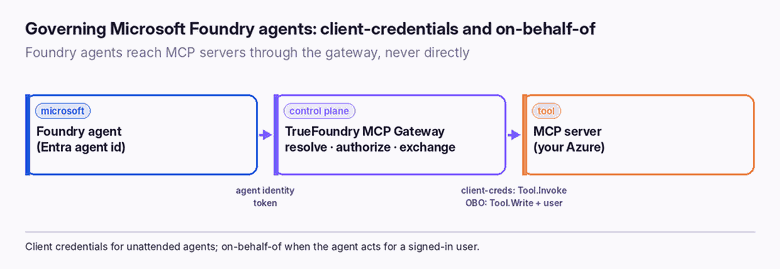
Each Foundry agent has an Entra agent identity, governed by an agent identity blueprint. You mirror it into the TrueFoundry Agent Registry as an identity-provider-backed entry — the same registration path every externally-issued agent uses:
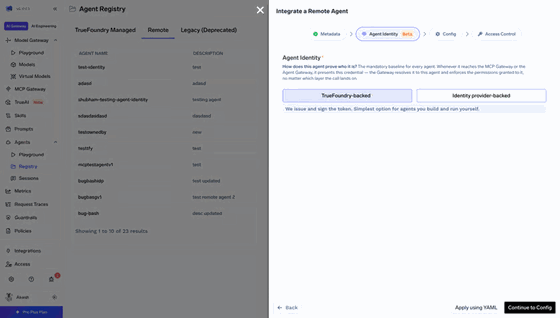
Entra issues the identity; TrueFoundry enforces the call path. Access is governed by the familiar collaborator grants — which MCP servers the agent may call, and which users it may act for — the model in enterprise MCP access control.
Three app registrations do the work, two of them shared across both modes:
On the TrueFoundry side, you register the MCP server with Entra inbound auth and an outbound config of Client Credentials (scope /.default) or JWT Bearer for on-behalf-of, then add the agent to the registry and grant it access to the server.
Leaving token version at 1. Set requestedAccessTokenVersion: 2 on agent-service, or the azp and issuer claims come out wrong and the gateway can't resolve the agent.
Skipping admin consent. Without it, the roles claim is simply missing and client-credentials calls fail with an insufficient-role error.
Resetting a credential without `--append`. It deletes existing secrets. And preAuthorizedApplications replaces rather than merges — re-adding one entry can drop the others.
Comma-separating scopes in Foundry. Scopes there are space-separated; client credentials uses /.default, not named scopes. Small syntax slips here surface as audience or scope errors downstream.
A team runs an unattended Foundry agent that enriches records from an internal MCP server. They create the mcp-api and agent-service registrations, expose the Tool.Invoke app role on mcp-api, grant it to agent-service, and admin-consent it. In Foundry they set the MCP connection to "Microsoft Entra — agent identity"; in TrueFoundry they register the server with Entra inbound and client-credentials outbound (/.default), and add the agent to the registry. Now the agent gets an identity token, the gateway exchanges it as agent-service, and the MCP server receives a clean Tool.Invoke application token — with the gateway's audit trail recording which agent made the call. When they later add a user-facing flow, they layer on the on-behalf-of registrations and switch that connection to identity passthrough.
"Route it through the gateway" is easy to say; it is worth being precise about what that actually buys, because each item is a control a direct agent-to-server call simply does not have:
These hold the same way in both modes; only the token brokering differs. That consistency is the point — you reason about access once, and it applies whether the agent runs unattended or on behalf of a person.
The docs split the configuration into two parts: client-credentials first, then on-behalf-of layered on top. Client credentials is the shorter path — roughly eleven steps — and it is worth doing first even if you ultimately want OBO, because it proves the plumbing before you add the user dimension.
On-behalf-of (part two) builds on that: add a Tool.Write delegated scope on mcp-api, create the agent-client registration with access_as_user and offline_access, pre-authorize agent-client on agent-service (appended, not replaced), set the Foundry connection to "OAuth identity passthrough → custom OAuth", and switch the TrueFoundry outbound config to "JWT Bearer".
Almost every failure here is claim-shaped — the call is refused because a token came out with the wrong version, audience, or scope. The fixes are specific:
One more that masks a correct fix: after changing consent, a cached token can keep failing — force a fresh token before concluding the configuration is wrong. If the gateway refuses with a registry subject mismatch, confirm the registry subject matches the agent identity object ID (client credentials) or the agent-client application ID on azp (on-behalf-of).
Foundry makes agents easy to build; the gateway makes them safe to run. By putting the TrueFoundry MCP Gateway on the path, a Foundry agent's tool calls get an identity Entra issues, an access decision TrueFoundry enforces, the right token exchange for the MCP server, and an audit line naming the agent — and, in on-behalf-of mode, the user too. Client credentials covers unattended work; on-behalf-of covers acting for a person. Unregistered agents simply don't get through.
That is the difference between a hosted agent that can reach your systems and one that reaches them under governance.
TrueFoundry AI Gateway delivers ~3–4 ms latency, handles 350+ RPS on 1 vCPU, scales horizontally with ease, and is production-ready, while LiteLLM suffers from high latency, struggles beyond moderate RPS, lacks built-in scaling, and is best for light or prototype workloads.




Through the TrueFoundry MCP Gateway rather than directly. The gateway authenticates the caller, resolves it to a registered agent, applies access policy, performs the token exchange the MCP server requires, and writes an audit line. Unregistered agents are refused.
Client credentials is for unattended agents with no user — the MCP server sees an app-only token with the Tool.Invoke role. On-behalf-of is for agents acting for a signed-in user — the token carries both the user and the agent, with a delegated Tool.Write scope.
As an identity-provider-backed entry in the Agent Registry, matched on the agent identity object ID in client-credentials mode, or the agent-client application ID (via the azp claim) in on-behalf-of mode.
Almost always because admin consent wasn't granted after assigning the Tool.Invoke app role, or because token version is still 1. Set requestedAccessTokenVersion to 2 on agent-service and grant admin consent.
Yes — Foundry agents perform their own token exchange, so the agent identity can be carried downstream, unlike Copilot Studio agents whose Entra Agent ID stays in the gateway audit trail.
Yes. The TrueFoundry Gateway can be self-hosted or deployed in your VPC, so agent tokens, exchanges, and audit stay within your environment alongside your Azure resources.



The latest news, articles, and resources sent to your inbox
.png)
.png)
.png)


.png)
.png)
.png)
.png)
.png)
.png)
.png)
.png)
.png)


