


.png)
October 27, 2026
|
5 min read


.png)
Blazingly fast way to build, track and deploy your models!
Copilot Studio lets business users build agents with no code. That is the point — and the problem. There is nothing to modify to add an identity header, scope a tool, or write an audit line. When such an agent calls an MCP server holding real data, you need identity, authorization, and audit that live outside the agent. The only place that can sit is the path its tool calls take, which is why governance happens at the MCP gateway.
Microsoft and TrueFoundry each hold one half of the answer:
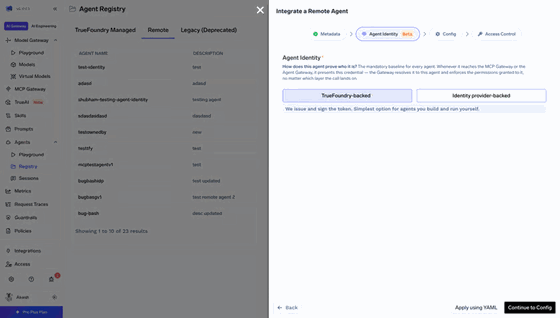
Put simply: Entra decides who the agent is; TrueFoundry decides what it may access and on whose behalf. You register the mirror the same way you register any externally-issued agent.
How much the gateway brokers — and whether it can be bypassed — depends on the mode you pick for the connector and MCP server:
In passthrough, the connector's token is valid at the MCP server directly, so only network controls keep the gateway on the path. In on-behalf-of, the connector's Resource URL points at agent-service; the MCP server rejects that audience, so the gateway is always on the path and the user is preserved. In client credentials, the gateway makes an app-only call with the Tool.Invoke role — the user is dropped at the gateway, so per-user checks happen only there.
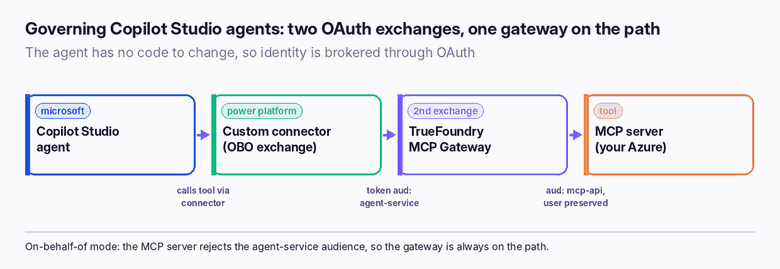
The full flow is an Azure-and-Power-Platform configuration; at a high level it is four stages:
The grants that matter are the familiar ones: which servers an agent may call (MCP Server User), which users it may act for (Agent Access), and who administers it — the model in enterprise MCP access control.
Leaving orchestration on classic. Under classic orchestration, Copilot Studio silently ignores MCP tools — nothing errors, the tools just never fire. Set orchestration to Generative first.
Shipping passthrough to production. Passthrough's only bypass protection is your network configuration. If the connector's token is valid at the MCP server directly, an attacker who reaches the server skips every gateway control. Use on-behalf-of for anything real.
Keying users on `sub`. In delegated modes, sub is pairwise per application. Key users on oid instead, or identities won't line up across apps.
Expecting the Entra Agent ID in the token. It does not travel with the call; per-hop attribution lives in the gateway audit trail, keyed on azp and the resolved identity.
In delegated (passthrough / OBO) modes, the server gets a token with aud set to mcp-api, scp containing Tool.Write, and a user. In client-credentials mode, it gets a token with roles containing Tool.Invoke and no user claims. Either way, the gateway has already resolved the agent and the user, applied policy, and written the audit line — the server just validates and serves.
The setup rests on up to three Entra app registrations, and knowing what each one is for makes the OAuth dance legible rather than magical:
Token passthrough needs only mcp-api and agent-client (two registrations); on-behalf-of and client credentials add agent-service (three). Grant admin consent on every registration, and — the detail that trips everyone — use delegated permissions for user flows and application permissions only for the client-credentials app role. Client credentials additionally needs the Tool.Invoke app role on mcp-api assigned to agent-service as an application permission.
The three modes are not three equivalent options — they are a security gradient, and the right default for anything touching real data is on-behalf-of. Here is the reasoning a reviewer should apply. Token passthrough forwards the connector's token to the MCP server unchanged; because that token is valid at the server directly, the only thing keeping the gateway on the path is network configuration, so an attacker who can reach the server bypasses every control. It is fine for a sandbox, dangerous in production. On-behalf-of points the connector's Resource URL at agent-service; the MCP server rejects that audience, so the gateway must perform the second exchange and cannot be skipped, while the user identity is preserved on the oid claim. Client credentials drops the user at the gateway and makes an app-only call with the Tool.Invoke role — appropriate only for genuinely unattended automation, and it moves every per-user authorization decision into the gateway because the MCP server never sees a user. If you cannot articulate why an agent is not on on-behalf-of, it should be.
A no-code agent still touches real systems, and "no code" means there is nowhere inside it to add identity, authorization, or audit. Copilot Studio hands that job to the gateway: the custom connector and the MCP gateway broker identity through OAuth, Entra says who the agent is, and TrueFoundry says what it may reach and on whose behalf — recording both on every call.
Pick on-behalf-of, keep the gateway on the path, and a black-box agent becomes an auditable one.
TrueFoundry AI Gateway delivers ~3–4 ms latency, handles 350+ RPS on 1 vCPU, scales horizontally with ease, and is production-ready, while LiteLLM suffers from high latency, struggles beyond moderate RPS, lacks built-in scaling, and is best for light or prototype workloads.




You govern it at the path its tool calls take. The Power Platform custom connector performs an OAuth on-behalf-of exchange and the TrueFoundry MCP gateway performs a second exchange into a token the MCP server accepts — adding identity, access control, and audit without touching the agent.
It is a directory identity Copilot Studio creates automatically for the agent, used for inventory, sponsorship, and Conditional Access. It does not appear in the tokens sent to the gateway, so TrueFoundry uses a mirror agent identity keyed on the azp claim for access decisions.
On-behalf-of for agents acting for a signed-in user: the MCP server rejects the agent-service audience, so the gateway stays on the path and the user is preserved. Client credentials for unattended agents. Avoid passthrough in production — only network controls keep the gateway on the path.
Most often because orchestration is set to classic. Copilot Studio silently ignores MCP tools under classic orchestration — switch it to Generative.
In passthrough and on-behalf-of modes, yes — key the user on oid, not sub. In client-credentials mode the user is dropped at the gateway, so per-user checks happen there and the server sees only an app identity with the Tool.Invoke role.
Yes. The gateway restricts tools through Virtual MCP Servers, and applies guardrails, rate limits, and tool approvals per server or tool — on top of the MCP Server User and Agent Access grants.



The latest news, articles, and resources sent to your inbox
.png)
.png)


.png)
.png)
.png)
.png)
.png)
.png)
.png)
.png)
.png)


