


.webp)
October 24, 2026
|
5 min read


.webp)
Blazingly fast way to build, track and deploy your models!
Out of the box, Cursor's AI agent only knows about your codebase. That's it. It can't see your Postgres tables, has no clue what GitHub issues are piling up, and definitely can't pull design tokens from Figma. MCP servers are what bridge that gap. They're lightweight programs that plug external tools into Cursor through one standardized protocol—the Model Context Protocol—so the agent can query databases, file issues, or fetch API data right from the editor.
Some quick history. Anthropic open-sourced MCP in November 2024. OpenAI adopted it by May 2025, and Google DeepMind brought Gemini support in April. Then, in December 2025, Anthropic donated the whole thing to the Agentic AI Foundation (under the Linux Foundation), co-founded with Block and OpenAI. That move was significant. MCP went from being Anthropic's project to a genuinely vendor-neutral standard.
Cursor has emerged as one of the go-to MCP clients among IDEs. But getting it set up properly—and understanding what can go wrong from both a config and security standpoint—takes more than just pasting a JSON snippet you found on Reddit.
This is one reason MCP vs API matters for IDE agents: APIs require explicit integration logic, while MCP lets Cursor dynamically load available tools from connected servers.
MCP defines three moving pieces. Hosts are the application—Cursor. Clients are connectors inside the host that handle individual server connections. Servers are the lightweight programs on the other end, exposing tools via JSON-RPC 2.0.
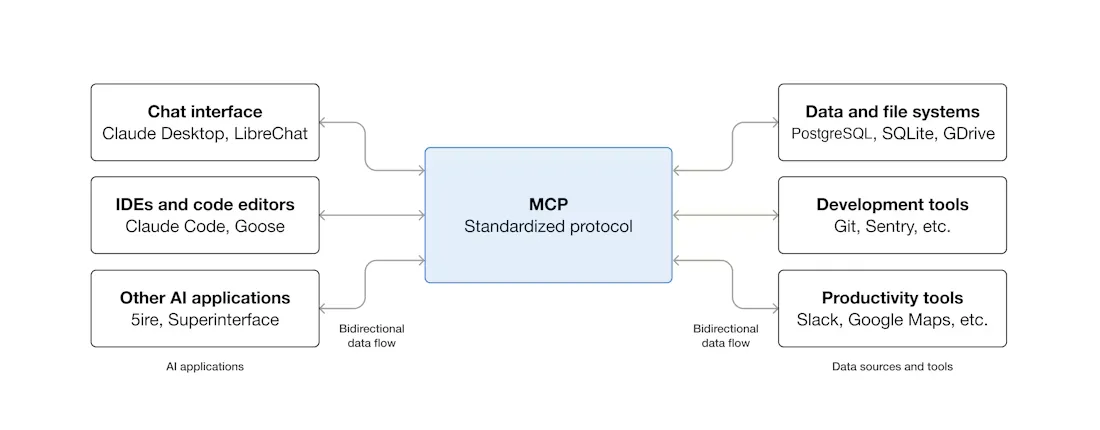
In practice? You open Cursor. Its Agent scans your enabled MCP servers, loads the tools they expose, and figures out which ones to call as part of whatever task it's working on. Head over to Cursor Settings > Tools & MCP and you'll see every loaded server with a status indicator. You can flip individual tools on or off from that panel.
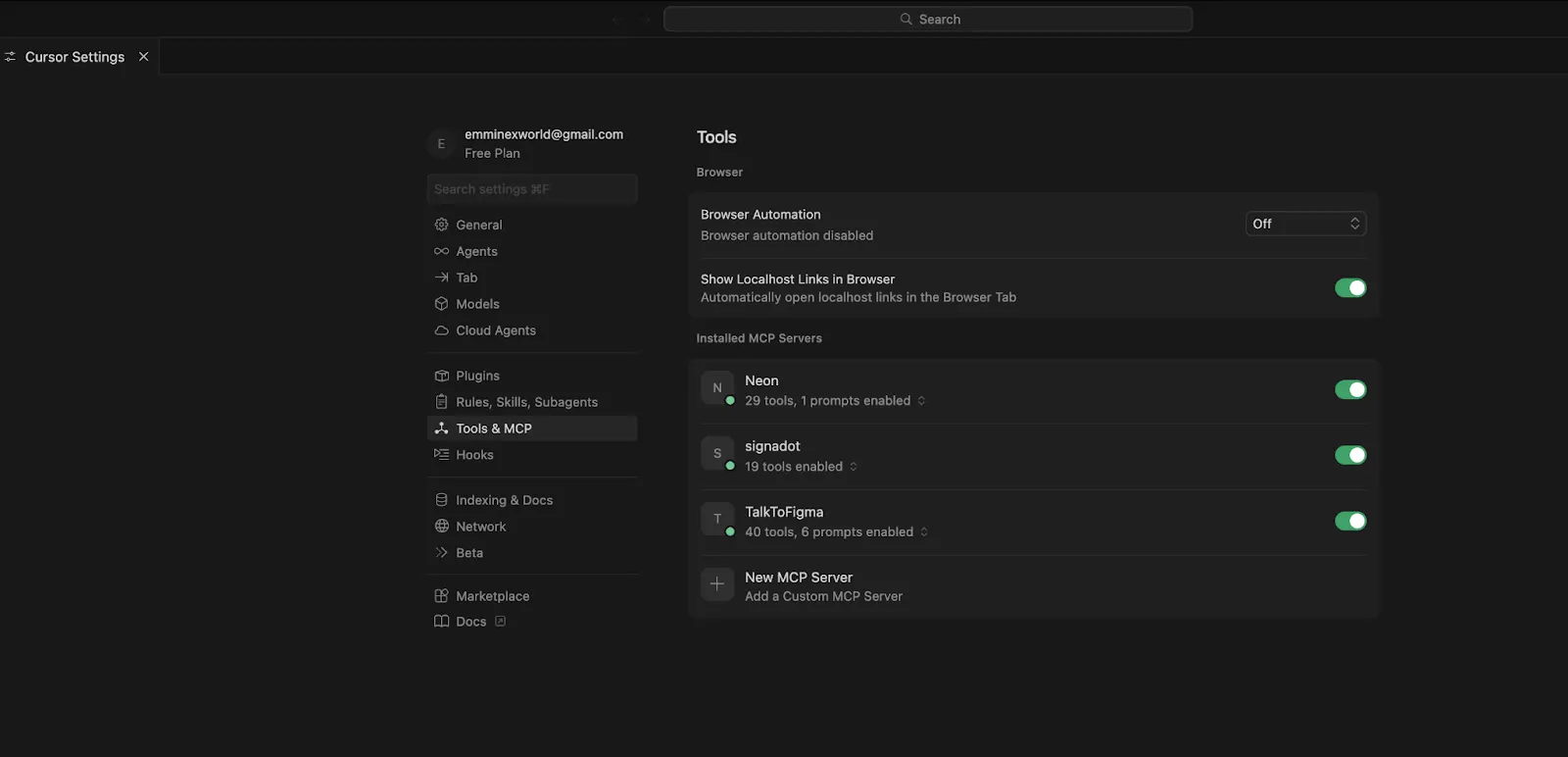
Servers can expose three types of things:
For a more thorough walkthrough of MCP architecture and server primitives, check out our guide on MCP and How It Works.
Three options here. Which one you pick depends on a simple question—local server or remote?
Our recommendation: stdio for local experimentation. Streamable HTTP for literally everything else.
More and more MCP servers now have an "Add to Cursor" button sitting right on their docs page. Click that, and Cursor opens a dialog with the server name, transport, and URL already filled in. Click Install. That's the whole process.
Servers requiring authentication will trigger a browser-based OAuth flow, and Cursor stores the resulting credentials for you. If you're a server developer wanting to add these deep links, the Cursor MCP documentation explains how.
Open Cursor Settings > Tools & MCP, hit New MCP Server (which drops you into mcp.json), or just create the file manually. Put it at .cursor/mcp.json inside your project for project-scoped config, or ~/.cursor/mcp.json for global.
Here's what a GitHub MCP server looks like running through Docker:
{
  "mcpServers": {
    "github": {
      "command": "docker",
      "args": [
        "run", "-i", "--rm",
        "-e", "GITHUB_PERSONAL_ACCESS_TOKEN",
        "ghcr.io/github/github-mcp-server"
      ],
      "env": {
        "GITHUB_PERSONAL_ACCESS_TOKEN": "<YOUR_TOKEN>"
      }
    }
  }
}
The fields, briefly:
Way simpler. Just a URL and optional headers:
{
  "mcpServers": {
    "remote-api": {
      "url": "https://mcp.example.com/mcp",
      "headers": {
        "Authorization": "Bearer <YOUR_API_KEY>"
      }
    }
  }
}
No command. No args. Cursor hits the HTTP endpoint directly.
Project config (.cursor/mcp.json in the repo root) affects only that project. Global config (~/.cursor/mcp.json) applies everywhere. Same server defined in both files? Project-level wins.
Cursor has a ceiling of roughly 40 active tools across all your MCP servers combined. Exceed it and two things happen: you get a warning, and the agent silently loses access to some tools. It just can't see them anymore.
Why does the limit exist? Each tool definition burns context tokens. And once you shove 40+ tool descriptions into a prompt, the LLM's ability to pick the right one deteriorates noticeably.
What to do about it: open each server in settings and switch off the tools you're not actively using. And as a general rule, a server exposing 5 to 10 well-defined tools will serve you better than one megaserver trying to do 30 things.
Your MCP server didn't start. Cursor shows no error. No warning. Nothing. You just notice that tools aren't showing up.
Nine times out of ten, the problem is one of these: Node.js or Python isn't installed (or isn't on your PATH). The package version in your config doesn't exist. Or an environment variable you referenced is either empty or completely missing.
Fastest way to debug: copy the command from your mcp.json verbatim and run it in a terminal. Like this: npx -y @modelcontextprotocol/server-postgres postgresql://localhost/mydb. Whatever error Cursor was swallowing will print right to your screen.
stdio transport and remote environments do not get along. The subprocess launches on the remote side, but Cursor expects it locally. You end up with intermittent connection failures that are incredibly annoying to track down.
Just use Streamable HTTP. Deploy the MCP server as a hosted endpoint and point Cursor at the URL. Saves hours of debugging.
We keep running into the same three:
Key Metrics for Evaluating Gateway
| Criteria | What should you evaluate ? | Priority | TrueFoundry |
|---|---|---|---|
| Latency | Adds <10ms p95 overhead for time-to-first-token? | Must Have | ✅ Supported |
| Data Residency | Keeps logs within your region (EU/US)? | Depends on use case | ✅ Supported |
| Latency-Based Routing | Automatically reroutes based on real-time latency/failures? | Must Have | ✅ Supported |
| Key Rotation & Revocation | Rotate or revoke keys without downtime? | Must Have | ✅ Supported |
| Key Rotation & Revocation | Rotate or revoke keys without downtime? | Must Have | ✅ Supported |
| Key Rotation & Revocation | Rotate or revoke keys without downtime? | Must Have | ✅ Supported |
| Key Rotation & Revocation | Rotate or revoke keys without downtime? | Must Have | ✅ Supported |
| Key Rotation & Revocation | Rotate or revoke keys without downtime? | Must Have | ✅ Supported |

MCP servers run code with your credentials. Let that sink in for a moment. Whatever permissions you hand a server—database access, GitHub tokens, API keys—it will use them. Every MCP server is, for all practical purposes, a fully trusted integration. If a server is compromised or malicious, it has everything you gave it.
2025 was a rough year for Cursor MCP security. Researchers published multiple critical CVEs, and each one exposed a fundamentally different attack surface:
More details on these topics in our guides on enterprise MCP security and access control patterns.
For a single developer, MCP is great. Set it up once, enjoy the productivity boost, move on. But scaling to a team of 20? Or 200? That's where the pain starts.
API keys end up scattered across individual laptops. There's no centralized view of which servers and tools are active across the org. Zero audit trail. And when somebody leaves the company—or even just switches teams—you're stuck rotating credentials in dozens of individual Cursor config files spread across who-knows-how-many machines.
An MCP Gateway puts a layer between your agents and your MCP servers that handles all of the above: centralized authentication, role-based access, observability, and policy enforcement.
TrueFoundry's MCP Gateway does exactly that. Developers authenticate once against the gateway. From that point on, the gateway manages every downstream OAuth token and credential for them. Administrators define per-server access controls and permissions through RBAC. Every tool call—every single one—gets logged with full request-level tracing.
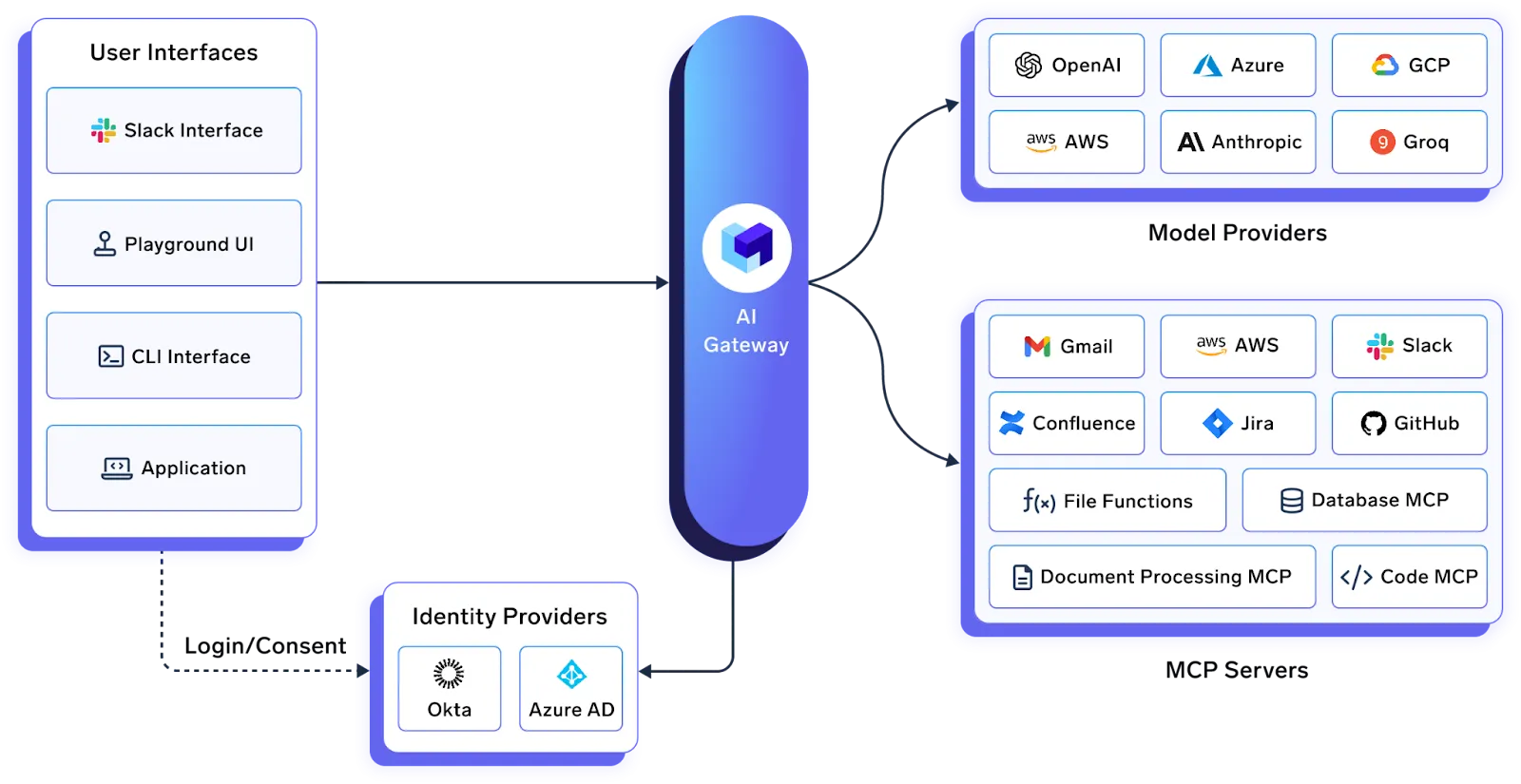
One feature worth calling out specifically: Virtual MCP Servers. The gateway can expose a scoped subset of tools from the servers behind it. Suppose you want an agent that can read GitHub issues but must never, under any circumstances, delete a repository. You don't enforce that via a system prompt the LLM might ignore. The gateway enforces it at the protocol level. The "delete repo" tool simply doesn't exist from the agent's perspective.
Organizations already running TrueFoundry's AI Gateway for LLM routing and cost control get native integration with MCP Gateway. One control plane covering models, tools, and agents.
Cursor can also connect directly to TrueFoundry's AI Gateway for centralized LLM routing, cost tracking, and key management.
MCP gives Cursor the ability to interact with real, external tools—not just your source files. Individual setup takes minutes. The actual engineering challenge shows up later: governance, credential management, access control, and observability at team scale.
Start small. One or two servers. Use deep links where available. Respect the 40-tool limit. Stay updated to keep ahead of security patches. And if you're deploying MCP across a team or org, look into an MCP Gateway before the credential sprawl problem solves itself by turning into a security incident.
Explore TrueFoundry's MCP Gateway or book a demo to see it in action.
A lightweight program connecting Cursor's AI agent to an external tool or data source via the Model Context Protocol. It exposes functions (called "tools") that the agent discovers and calls during workflows. GitHub, Postgres, Figma, Slack—they all have MCP servers available.
Three ways. One-click deep-link buttons on the server's docs page (easiest). The Cursor Settings > Tools & MCP > New MCP Server UI. Or manually creating .cursor/mcp.json (project-scoped) or ~/.cursor/mcp.json (global).
Around 40 active tools across all servers. Past that, the agent gets worse at picking the right tool because context fills up. Turn off what you're not using.
Yes. Resources shipped in v1.6 (September 2025)—contextual data like schemas and file contents. Elicitation landed in v1.5 (August 2025)—servers can ask for structured user input mid-execution.
Depends on your setup. MCP servers run code with the permissions you provide. Researchers found multiple critical vulnerabilities in 2025, all patched quickly. Keep Cursor current, disable auto-run, restrict credentials, pin package versions, and audit third-party servers before adding them.
Through an MCP Gateway. TrueFoundry's gateway centralizes auth, enforces RBAC, and logs every tool invocation. Admins control exactly which teams get access to which servers. See our MCP gateways comparison for a detailed breakdown.
TrueFoundry AI Gateway delivers ~3–4 ms latency, handles 350+ RPS on 1 vCPU, scales horizontally with ease, and is production-ready, while LiteLLM suffers from high latency, struggles beyond moderate RPS, lacks built-in scaling, and is best for light or prototype workloads.






The latest news, articles, and resources sent to your inbox

.webp)

.png)
.png)
.png)
.png)
.png)
.png)
.png)
.png)
.png)
.png)
.png)


