


.webp)
October 24, 2026
|
5 min read



Blazingly fast way to build, track and deploy your models!
Enterprises today face complex challenges in integrating AI with diverse internal systems. The Model Context Protocol (MCP) defines a standardized JSON-RPC interface allowing organizations to expose Tools, Resources, and Prompts to AI models without bespoke code.
By decoupling AI-driven applications from point-to-point integrations, an enterprise MCP Server delivers multi-tenant isolation, geo-distributed scaling, unified observability, and governance controls, all while accelerating development and reducing operational risk. In the following sections, we’ll examine core MCP Server components, architectural patterns for enterprise deployments, and security best practices. Finally, we’ll highlight how TrueFoundry’s AI Gateway leverages MCP with server groups, an interactive playground, and seamless integration within the TF console.
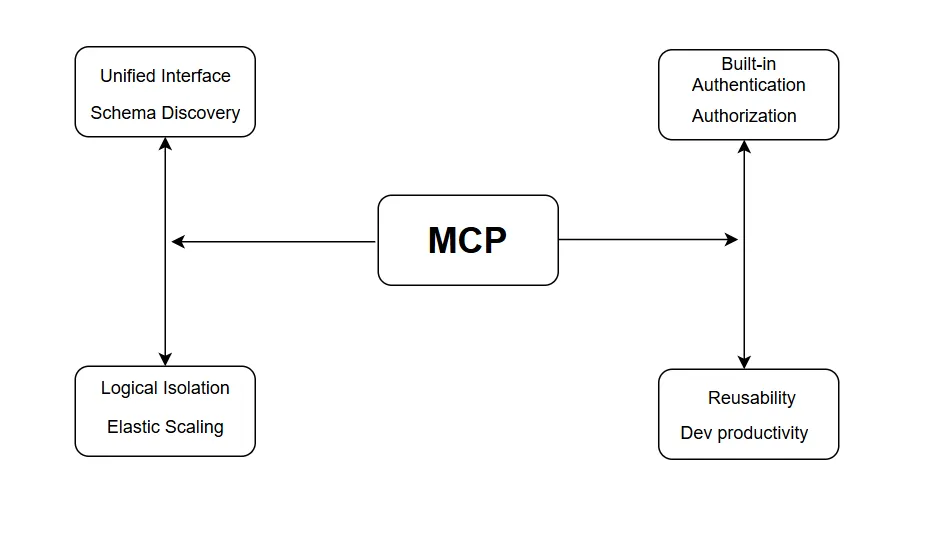
Enterprises adopting AI face growing complexity as they integrate models with diverse internal systems, CRMs, data warehouses, document stores, and more. An enterprise MCP server delivers critical value by standardizing these integrations, enforcing governance, and enabling scalable, secure deployments.
Unified Interface for All Services: MCP exposes internal capabilities as three well-defined abstractions: Tools (invokable actions), Resources (read-only endpoints), and Prompts (preconfigured templates). This removes the need to write custom API wrappers for each service, dramatically reducing development overhead.
Consistent Schema & Discovery: Clients perform a simple handshake to discover available capabilities and their schemas. This eliminates brittle point-to-point code and ensures that new services can be onboarded by merely registering them with the MCP Server.
To understand how centralized discovery works at scale, explore our detailed guide on What is an MCP Registry?
Logical Isolation: MCP Servers support namespaces or “server groups” to partition workloads by environment (development, staging, production) or by business unit. This ensures strict separation of data and permissions, meeting enterprise multi-tenant requirements without complex custom architectures.
Elastic Scaling: Packaged as containerized microservices, MCP Servers can be deployed behind load balancers and auto-scaled across regions. Enterprises can handle thousands of concurrent model calls with predictable low latency and high availability.
Built-in Authentication & Authorization: By integrating standard OAuth/OIDC flows and role-based access control (RBAC), MCP enforces least-privilege access to sensitive tools and data endpoints. Tokens and scopes ensure that only authorized AI agents can invoke specific operations.
Sandboxing & Input Validation: MCP Servers validate all incoming JSON-RPC requests against registered schemas, mitigating risks such as prompt injection or malformed payloads. This sandboxed execution protects backend systems from unintended side effects.
End-to-End Tracing: Every tool invocation and data fetch is logged with unique request identifiers. Distributed tracing systems (e.g., OpenTelemetry) can correlate AI prompt inputs to downstream service calls, simplifying root-cause analysis.
Centralized Metrics & Alerts: MCP exposes metrics such as request volume, error rates, and latency distributions to enterprise monitoring platforms (Prometheus, Datadog). This empowers DevOps teams to set SLAs and alarms for AI-driven workflows.
Reusable Components: Once an MCP Server is in place, teams can onboard new AI use cases, chatbots, analytics, and automation by simply defining new Tools or Resources. There’s no need to reinvent integration logic each time.
Developer Productivity: The interactive MCP playground (available in platforms like TrueFoundry) lets engineers explore and test service endpoints live, shortening feedback loops and reducing integration bugs.
By providing a standardized, secure, and scalable integration layer, MCP transforms AI from an isolated experiment into a governed, enterprise-grade capability, accelerating innovation and reducing operational risk.

The MCP Server acts as the centralized gateway through which AI models interact with an enterprise’s internal services. By defining a clear protocol for invoking actions, fetching data, and assembling prompts, it eliminates custom integration code and enforces consistency across applications.
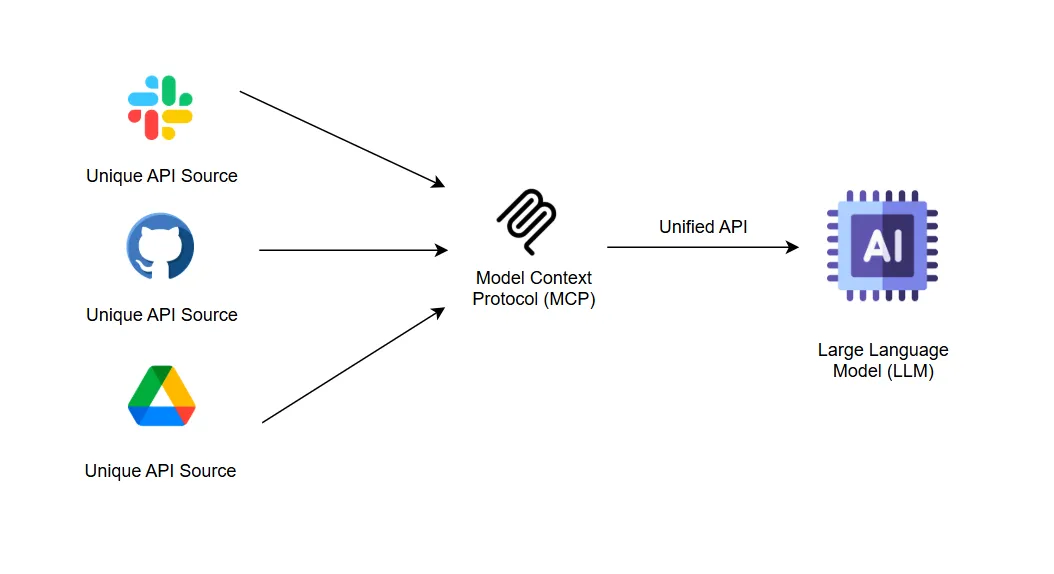
Below, we examine its five core components and how they work together to deliver a secure, scalable, and maintainable integration layer.
Tools expose enterprise capabilities as named functions with strict input and output schemas. When a client issues a tool.invoke request, the MCP Server validates the payload, executes the underlying operation, such as creating a calendar event or triggering a payment, and returns the result or an error in JSON. Centralizing these actions eliminates the need for custom API glue code and standardizes error handling.
Resources provide read-only access to contextual data via a defined response schema that mirrors backend structures. A client’s resource.get request prompts the server to fetch information, such as customer profiles, inventory levels, or knowledge-base entries, and return it in structured JSON. This separation of data retrieval from action invocation preserves clear audit trails and prevents unintended side effects.
Prompts consist of predefined text templates or parameterized instruction sets that guide model behavior consistently. When a client references a prompt by name and supplies dynamic values, the server merges those inputs into a compliant prompt string. This approach enforces corporate style guidelines and simplifies prompt updates without modifying client implementations.
The MCP Server supports two communication modes. Local integrations use standard input/output streams for direct, low-latency embedding in desktop or command-line environments. Remote deployments rely on HTTP with Server-Sent Events to support long-running operations and partial result streaming. Teams choose the appropriate transport based on their infrastructure and performance requirements.
The handshake mechanism enables clients to discover server capabilities and negotiate compatibility. A client sends an mcp.handshake call to retrieve the server’s protocol version, supported transports, and a catalog of registered tools, resources, and prompts, along with their schemas. With that metadata, the client adapts dynamically, supporting backward compatibility and gradual feature rollout.
An enterprise MCP server deployment follows a clear host-client-server topology that cleanly separates responsibilities. Hosts, such as AI agents or applications, embed MCP client libraries that manage communication and context tracking. These clients perform an initial handshake with one or more MCP servers to discover available Tools, Resources, and Prompts along with their input and output schemas.
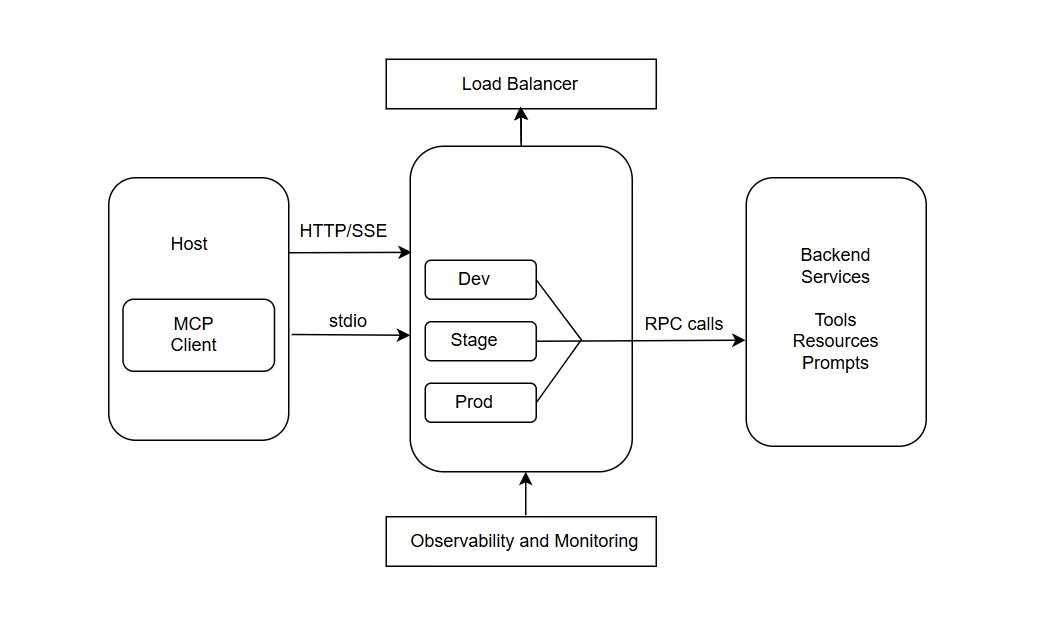
Once capabilities are registered, hosts invoke actions or fetch data by sending JSON-RPC requests over the selected transport, and servers route them to the appropriate backend systems. This pattern eliminates hardcoded integrations and allows hosts to adapt to new services simply by updating server configurations.
To support high volumes of concurrent model calls, enterprises deploy MCP servers in containerized clusters behind load balancers. Horizontal scaling ensures capacity can grow on demand, while multi-region deployments reduce latency for globally distributed teams.
Logical isolation is achieved by grouping servers into namespaces or server groups, which may correspond to environments (dev, staging, production), business units, or regions. Each group enforces its own authentication tokens and role-based access controls, guaranteeing that only authorized hosts can invoke specific actions or access sensitive data. Canary or blue-green deployment strategies allow gradual rollouts of new capabilities with minimal impact on ongoing operations.
Robust observability is central to maintaining reliability and compliance. Enterprise MCP servers emit structured logs for every invocation, including timestamps, request identifiers, payload schemas, and response statuses. Integration with distributed tracing systems enables teams to follow request flows from the AI prompt through downstream services, expediting root-cause analysis in case of failures. Metrics such as request volume, error rates, and latency percentiles feed into centralized monitoring dashboards and alerting engines, empowering DevOps teams to define service-level objectives and receive early warnings of degradation.
By combining a modular host-client-server design with scalable deployment patterns and comprehensive monitoring, an enterprise MCP server architecture provides a resilient, secure, and extensible foundation for integrating AI models with diverse internal systems.
MCP (Model Context Protocol) servers act as a standardized bridge between AI applications, such as large language models (LLMs), and enterprise systems. Instead of building custom point-to-point integrations for every AI model and backend system, enterprise MCP servers provide a uniform interface. This allows AI agents to securely and dynamically access enterprise data, tools, and workflows. You can think of them as a “USB-C for AI”, enabling multiple AI agents to connect to enterprise capabilities without worrying about system-specific complexities.
MCP servers sit between the AI client and enterprise backend, decoupling AI logic from system changes. This ensures that updates to backend APIs only require adjustments on the MCP server, not the AI agent itself. MCP servers provide standardized abstractions that make enterprise capabilities accessible in a predictable way:
MCP servers support multiple connection methods depending on enterprise requirements for security, latency, and scalability:
MCP servers in enterprises unlock a wide range of practical applications:
Security and governance are foundational to deploying MCP servers in enterprise environments. Since MCP servers act as intermediaries between AI applications and internal systems, they must enforce strict controls over who can access what, under which conditions, and with full traceability.
MCP supports modern enterprise authentication standards, including OAuth 2.0, OpenID Connect (OIDC), and API token-based mechanisms. When an AI host attempts to invoke a tool or resource, the MCP server verifies its identity and validates the associated scopes or roles. Enterprises can configure fine-grained role-based access control (RBAC) to limit access to specific server groups, tools, or resource paths. This helps enforce the principle of least privilege and prevents unauthorized access to sensitive operations.
MCP servers can be logically divided into server groups to isolate environments (such as dev, staging, and production) or separate business units. Each group can have its own access policies, tokens, and usage limits. This design prevents cross-contamination between environments and ensures that testing workloads never interfere with production systems.
MCP enforces strict input and output validation using JSON schema definitions registered during tool and resource setup. Any request that deviates from the defined schema is automatically rejected. This reduces the risk of malformed payloads, injection attacks, and unintended side effects, particularly when AI models generate dynamic requests.
Every invocation to a tool, resource, or prompt is logged with rich metadata, including timestamps, user identifiers, input payloads, and response outcomes. These logs can be integrated into enterprise Security Information and Event Management (SIEM) systems for real-time monitoring and incident response. Additionally, distributed tracing tools like OpenTelemetry allow full traceability from model prompt to backend execution, supporting compliance with internal audit and regulatory requirements.
MCP servers support rate limiting, token expiration policies, and usage quotas to prevent misuse or overconsumption. Enterprises can implement governance layers on top of MCP to enforce approval workflows, usage caps, and audit-based reviews for high-risk tools or data endpoints.
Together, these controls ensure that MCP servers operate as secure, policy-compliant, and auditable gateways between AI systems and core enterprise infrastructure.
While MCP (Model Context Protocol) servers provide a powerful way to integrate AI applications with enterprise systems, deploying them at scale comes with several challenges that organizations must address.
Enterprises often have diverse and legacy systems, from ERP platforms like SAP to custom internal tools. Ensuring MCP servers can reliably connect to all these systems without breaking workflows requires careful planning, thorough testing, and sometimes custom adapters. Integration across multiple environments can be complex, particularly when APIs are inconsistent or poorly documented.
As AI usage grows, MCP servers must handle high volumes of concurrent requests from multiple AI agents. Scaling these servers horizontally, managing load balancing, and maintaining low-latency responses across geographies can be challenging, especially for enterprises with globally distributed teams.
MCP servers deal with sensitive enterprise data. Implementing robust authentication, authorization, and encryption mechanisms is critical. Enterprises also need to ensure compliance with data privacy regulations like GDPR or HIPAA, and mistakes in role-based access controls or audit logging can create serious compliance risks.
Maintaining a reliable MCP deployment requires continuous monitoring of requests, error rates, and latency. Without proper observability, failures in downstream systems or AI interactions may go undetected, impacting operations. Integrating structured logging, tracing, and alerting systems is necessary but adds operational complexity.
Enterprise APIs and internal systems evolve frequently. MCP servers must adapt to these changes while ensuring backward compatibility for AI agents. Rolling out updates without disrupting active integrations requires careful versioning, canary deployments, and testing.
Defining fine-grained access policies for different AI agents and departments can be challenging. Enterprises must enforce strict RBAC policies, mask sensitive data, and maintain audit logs without affecting system performance or AI functionality.
MCP Servers in enterprise systems give full control, high customization, and strong data privacy, while requiring more effort to deploy, maintain, and scale, whereas MCP Services offer a ready-to-use, fully managed, and scalable solution that lets teams focus on AI applications rather than infrastructure, albeit with slightly less control.
TrueFoundry extends the standard MCP model with powerful enterprise-ready tooling inside its AI Gateway. Instead of managing scattered server endpoints, developers can register, test, and orchestrate MCP Servers from a single unified interface. This streamlines not just deployment but also governance, observability, and developer experience. Whether you’re invoking a Kubernetes tool or accessing a business-specific resource, TF ensures consistent security, performance, and scalability. Below, we explore the three core capabilities that make this possible.
TrueFoundry’s MCP Gateway offers a centralized MCP registry that lists all internal and external MCP servers organized into logical groups.
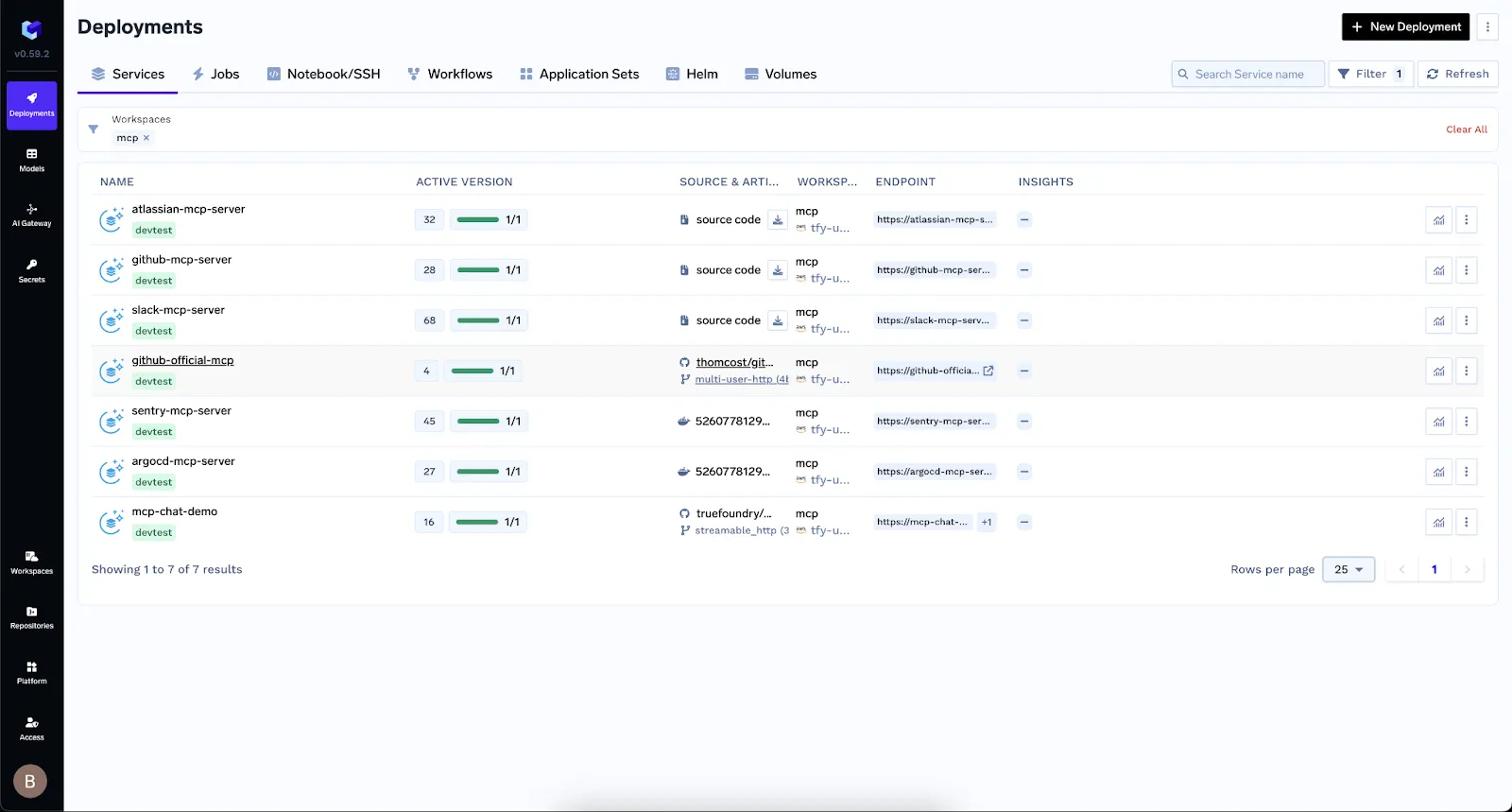
These groups allow environment isolation (such as development, staging, and production) and support approval workflows. Each server is versioned, discoverable, and fully auditable, simplifying governance and streamlining integration efforts.
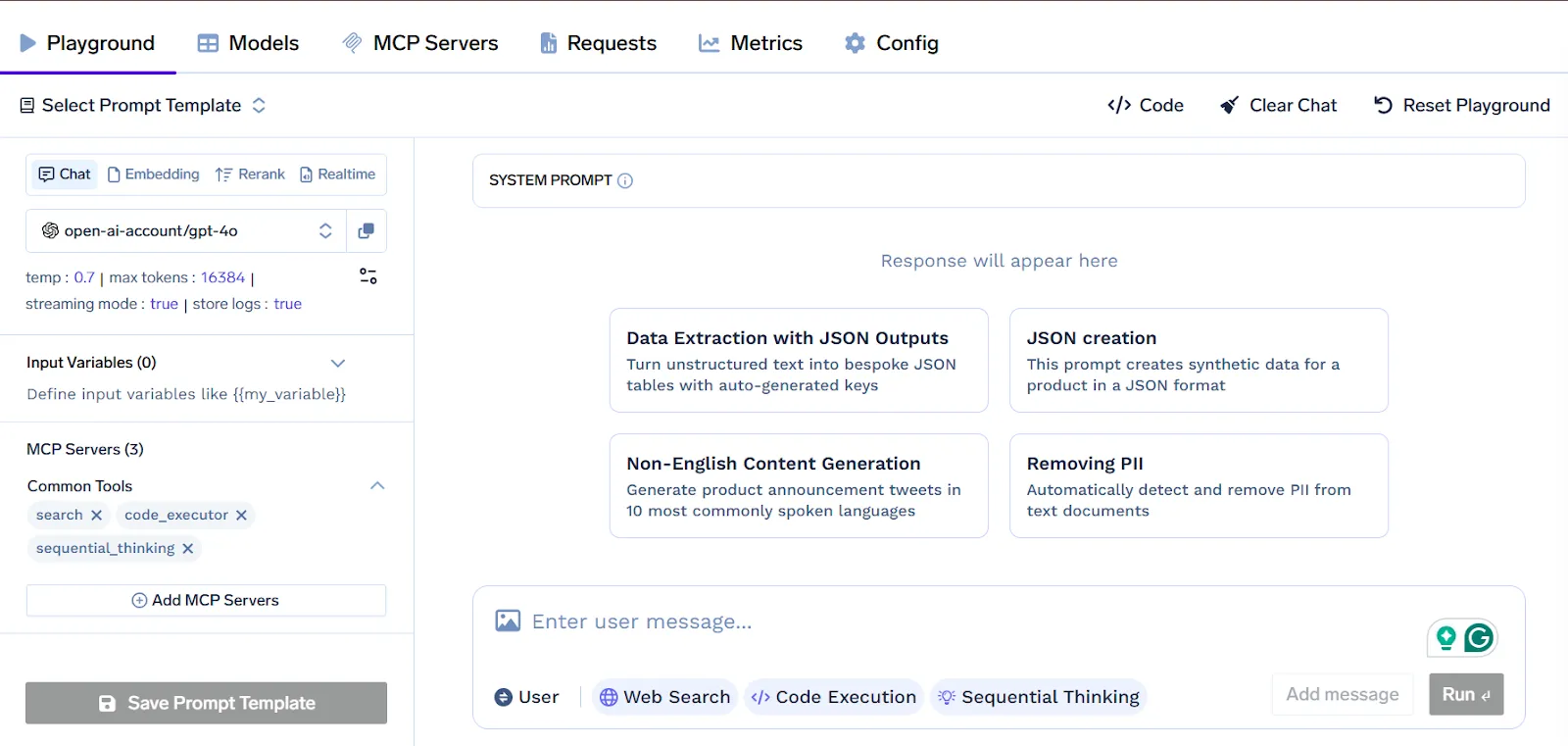
After registration, MCP servers are instantly available in the TrueFoundry Playground. Developers can inspect schemas, test tools, and run prompts in real time—all without writing code. The Gateway supports both prebuilt connectors (Slack, GitHub, Datadog, Sentry) and custom services, utilizing the MCP abstractions, Tools, Resources, and Prompts for seamless integration.
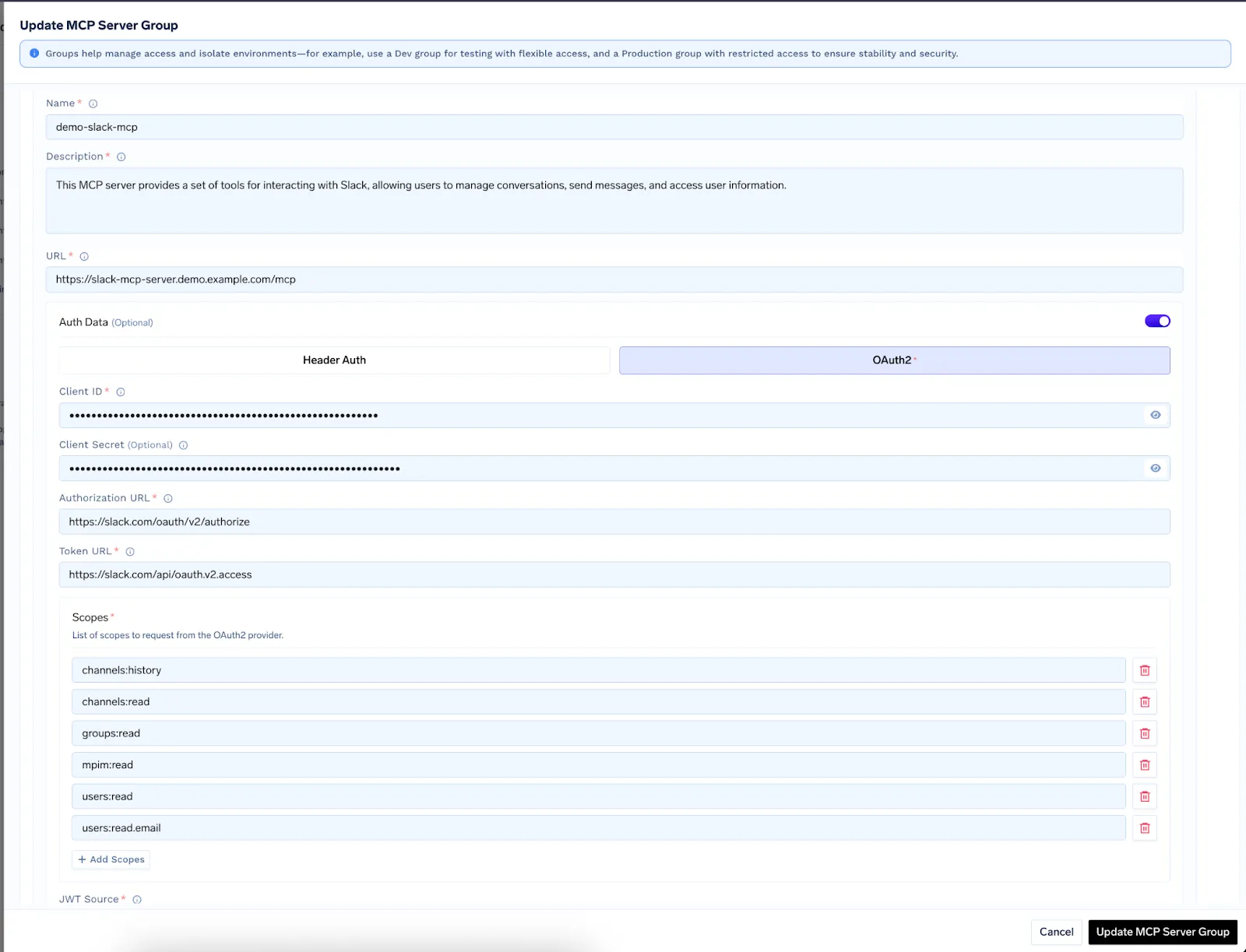
TrueFoundry manages authentication centrally using federated logins via Okta, Azure AD, and OAuth2, plus options for header‑based tokens. The Gateway handles token exchanges and refresh cycles, storing credentials securely. Administrators can configure access control policies to ensure only authorized users and agents call specific MCP servers.
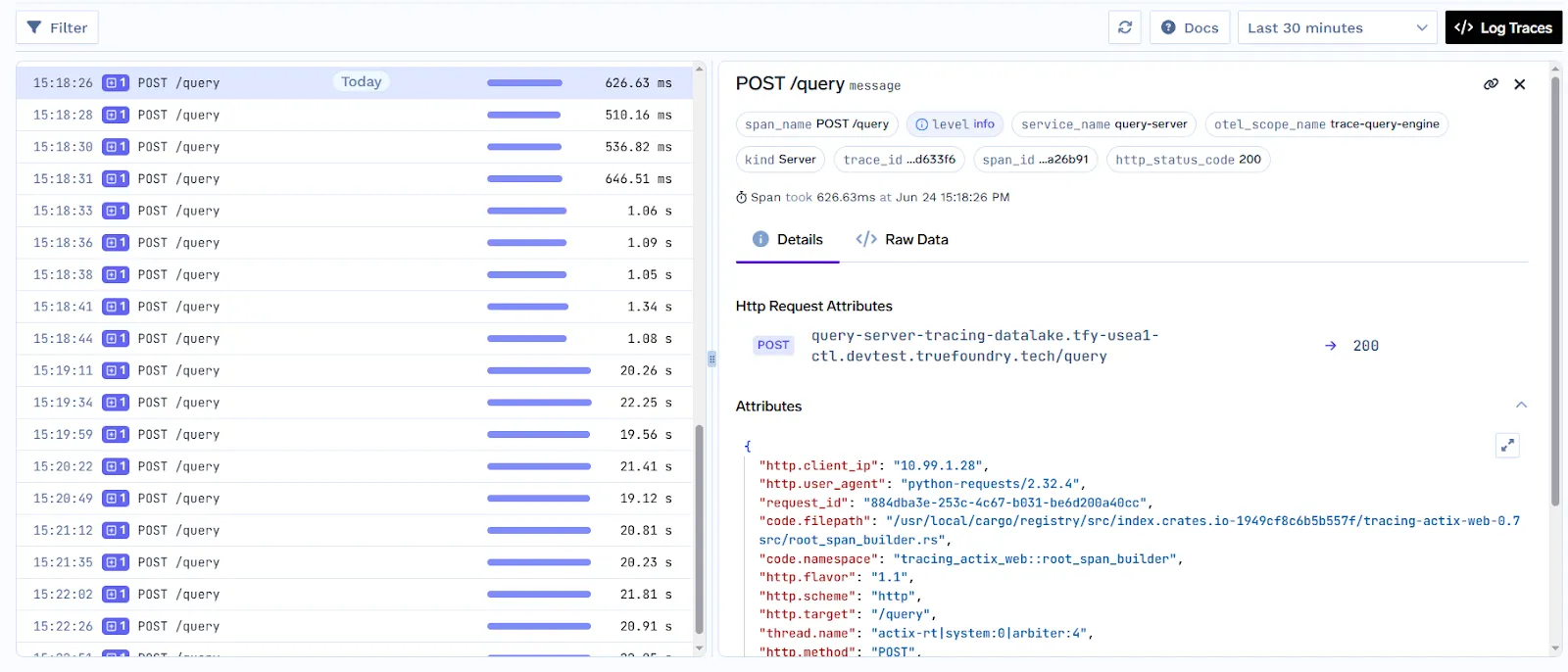
Every request between AI agents and MCP servers passes through the Gateway, allowing full observability. The system records structured telemetry including request volumes, latency, error rates, and metadata. All actions are trace‑logged, audited, and can be visualized or exported to monitoring tools. Role-based access control, rate-limiting, and centralized governance ensure a secure and compliant operation.
MCP Servers in enterprises enable AI systems to securely interact with internal enterprise tools and data, making them a powerful enabler for automation and decision support. In customer support, MCP connects AI agents to CRMs and ticketing systems, allowing them to retrieve history, escalate issues, or draft responses using predefined prompts, reducing response time and agent workload.
In finance, MCP Servers expose Resources for querying accounting systems or data warehouses. AI models use these to generate monthly summaries, spot anomalies, or prepare compliance reports. Because access is schema-bound and read-only, it aligns with audit and security policies.
Supply chain teams use MCP tools to check inventory, place orders, or coordinate with vendors. Server groups allow isolating workflows by geography or department, maintaining control and reliability.
Sales and marketing benefit from MCP-powered AI assistants that pull personalized product data, pricing, and competitive insights in real time, boosting deal velocity and relevance. In IT operations, AI agents can trigger infrastructure actions like restarting services or checking logs via MCP tools safely and with full audit trails.
Across functions, MCP bridges AI reasoning with enterprise execution, helping businesses automate responsibly, improve productivity, and reduce integration overhead.
The Model Context Protocol (MCP) Server provides enterprises with a standardized, secure, and scalable way to integrate AI systems with internal tools and data. By separating application logic from backend services, MCP enables faster development, stronger governance, and consistent observability.
With support for tools, resources, and prompts, it transforms AI from a passive assistant into an active enterprise operator. Platforms like TrueFoundry further enhance this experience with secure onboarding, interactive testing, and unified control through their AI Gateway. For organizations looking to operationalize AI safely and efficiently, MCP offers the infrastructure backbone to make that possible at scale.
An enterprise MCP server is a standardized integration layer that securely connects LLMs to internal data and tools. It utilizes the Model Context Protocol to provide a universal bridge, replacing custom-coded integrations. This allows platform teams to maintain centralized governance, authentication, and fine-grained access control over sensitive corporate resources.
Enterprises should use MCP servers to eliminate integration sprawl and prevent vendor lock-in. By standardizing how AI models discover and interact with internal APIs, organizations can accelerate agent development while ensuring strict security compliance. This architecture decouples the reasoning engine from the data source, allowing for seamless model upgrades across the stack.
The primary benefits include rapid tool discovery, reduced engineering overhead, and enhanced data security. MCP servers enable "write-once, use-anywhere" integrations that work across different LLM providers. Additionally, they provide comprehensive audit trails and PII masking, ensuring that autonomous agents operate safely within governed corporate environments while accessing real-time context.
Enterprise MCP servers standardizes how AI models connect to diverse systems by exposing Tools, Resources, and Prompts through a unified JSON-RPC interface. This removes the need for bespoke connectors, accelerates development, and ensures consistency across projects. Enterprises gain faster onboarding of new services and reduced maintenance overhead.
An MCP server comprises five key parts: Tools for invoking actions, Resources for read-only data, Prompts for templated instructions, Transports (HTTP or STDIO) for communication, and a Handshake mechanism for capability discovery. Together, they enforce schemas, enable dynamic discovery, and provide a predictable interface for AI agents.
MCP servers in enterprises are secured by integrating OAuth 2.0 or OIDC for authentication, enforcing role-based access control, and logically isolating server groups. Input validation against JSON schemas prevents malformed requests. Audit logs and distributed tracing offer full visibility, while rate limits and governance policies ensure compliance with internal and external regulations.
TrueFoundry’s AI Gateway centralizes MCP Server registration, authentication, and token management. Its interactive Playground lets developers test Tools, Resources, and Prompts without code. The Chat API integrates conversational agents with governance controls. Unified dashboards deliver metrics, logs, and alerts, making it easier to manage security, scaling, and developer experience across all MCP deployments.
TrueFoundry AI Gateway delivers ~3–4 ms latency, handles 350+ RPS on 1 vCPU, scales horizontally with ease, and is production-ready, while LiteLLM suffers from high latency, struggles beyond moderate RPS, lacks built-in scaling, and is best for light or prototype workloads.






The latest news, articles, and resources sent to your inbox

.webp)

.png)
.png)
.png)
.png)
.png)
.png)
.png)
.png)
.png)
.png)
.png)


