


September 18, 2026
|
5 min read


Blazingly fast way to build, track and deploy your models!
LangChain vs LangGraph vs LangSmith isn't really a competition. All three come from the same company, and most teams building agents on this stack end up using more than one of them at the same time. The confusion is understandable though: the names are similar, the docs cross-reference each other constantly, and it's genuinely not obvious from the outside which one you actually need.
Rather than choosing one over another, many organizations use them together as their AI applications mature from building prototypes with LangChain, orchestrating sophisticated agent workflows with LangGraph, and ensuring reliability with LangSmith.
In this guide, we'll compare LangChain vs LangGraph vs LangSmith, explain what each tool does, highlight their strengths and limitations, and help you decide which one best fits your AI development workflow.
LangChain is the framework layer: LCEL (LangChain Expression Language), the Runnable protocol, prompt templates, and integrations to hundreds of tools and data sources. As of LangChain 1.0, LCEL is the canonical way to compose steps: every prompt, model, retriever, and parser implements the same Runnable interface, so you can pipe them together with prompt | model | parser and get a single callable object with .invoke(), .stream(), and .batch() for free. LangChain also ships a higher-level create_agent API for teams who want agent behavior without hand-building a graph.

LangGraph is the orchestration layer for agents that need to loop, branch, and hold state across many steps instead of running in a straight line. It models the agent as a StateGraph: nodes are functions, edges (including conditional edges) decide what runs next, and a shared state object flows through the whole thing.

LangSmith is the platform that sits on top of both. Decorate a function with @traceable and it captures inputs, outputs, and every nested call as a run in a run tree. It's also where evaluation datasets, LLM-as-judge and custom evaluators, and (via LangGraph Platform) hosted deployment live.
The 2026 recommendation from the LangChain team, is exactly this division of labor: LangChain for building blocks, LangGraph for anything agentic or multi-step, LangSmith for observability.

The practical difference between LangChain and LangGraph comes down to how much control you need over the execution path. A LangChain chain runs step one, then step two, then step three. That's fine for a lot of use cases: retrieval-augmented generation, simple tool calls, straightforward pipelines.
Agents that need to decide what to do next based on what just happened, call a tool, look at the result, then decide again, are a different problem. That's what LangGraph was built for. It represents the agent as nodes and edges, so you can express loops, conditional branches, and checkpoints explicitly instead of hacking them into a linear chain. Most production agent frameworks, LangGraph included, converge on this graph-based model for exactly this reason.
You don't have to choose one over the other in practice. LangGraph agents commonly still use LangChain's integrations and prompt utilities underneath; LangGraph is closer to an evolution of how you structure the agent loop than a full replacement for LangChain.
A LangChain LCEL chain is a Runnable pipeline. Each composes one Runnable into the next, and the whole chain still behaves like a single Runnable, which is what makes streaming and batching work consistently through every step.
That model covers a lot of ground: RAG pipelines, structured extraction, simple tool calls. It starts to break down once the agent needs to decide what to do next based on what just happened, call a tool, look at the result, and decide again, possibly looping several times before it's done.
LangGraph models that as a graph instead of a pipe. State is defined explicitly (a TypedDict or Pydantic model), nodes read and update it, and conditional edges route execution based on the current state rather than a fixed sequence.
You don't have to choose one over the other in practice. LangGraph nodes routinely call out to LCEL chains internally; LangGraph is closer to an additional execution layer on top of LangChain's primitives than a full replacement for them.
This comparison confuses people the most, because LangGraph and LangSmith solve genuinely different problems that happen to show up in the same sentence a lot.
LangGraph is the thing your agent runs on: the graph definition, the state, the execution logic. LangSmith is how you see what happened after it ran. Every LLM call, tool call, and state transition inside a LangGraph agent can be traced in LangSmith, and LangSmith is also where LangGraph Platform lives if you want a hosted deployment instead of running the graph on your own infrastructure.
Put simply: LangGraph without LangSmith still works, you just lose visibility into what your agent is doing and any built-in hosting. LangSmith without LangGraph doesn't make much sense, since LangSmith needs something to trace.
LangGraph is the thing your agent runs on: the graph definition, the state, the checkpointed execution. LangSmith is how you see what happened after it ran, and in many setups, where it's hosted.
Wrap a function in @traceable (or instrument it via LangGraph's built-in LangSmith integration) and each LLM call, tool call, and nested subgraph call becomes a span in a run tree, with the parent run showing total latency and each child showing its own.
Beyond tracing, LangSmith's evaluation workflow runs on datasets, collections of input/output examples created through the SDK, scored by evaluators you define as LLM-as-judge, custom code, or human feedback. Online evaluators can score production traces continuously rather than only during a pre-release test run, which is closer to a live quality dashboard than a one-time test suite.
Put simply: LangGraph without LangSmith still runs, you just lose the run tree, the eval datasets, and the option of LangGraph Platform hosting. LangSmith without LangGraph doesn't do much on its own, since it needs a traced application to observe.
Most real agent projects don't pick one of these three, they use a subset together. A typical stack: build the agent logic in LangGraph (using LangChain's integrations where useful), then run it with LangSmith tracing turned on so you can see what it's doing once it's live. Skipping LangSmith is common for small prototypes; skipping LangGraph is common if your use case is simple enough that a linear LangChain pipeline actually covers it.
Where this gets more complicated is production scale. LangSmith's tracing is genuinely useful, but it doesn't manage credentials for the tools your agent calls, and it doesn't give you model-level governance across a team. Those become separate problems you have to solve once you're running more than a handful of agents.
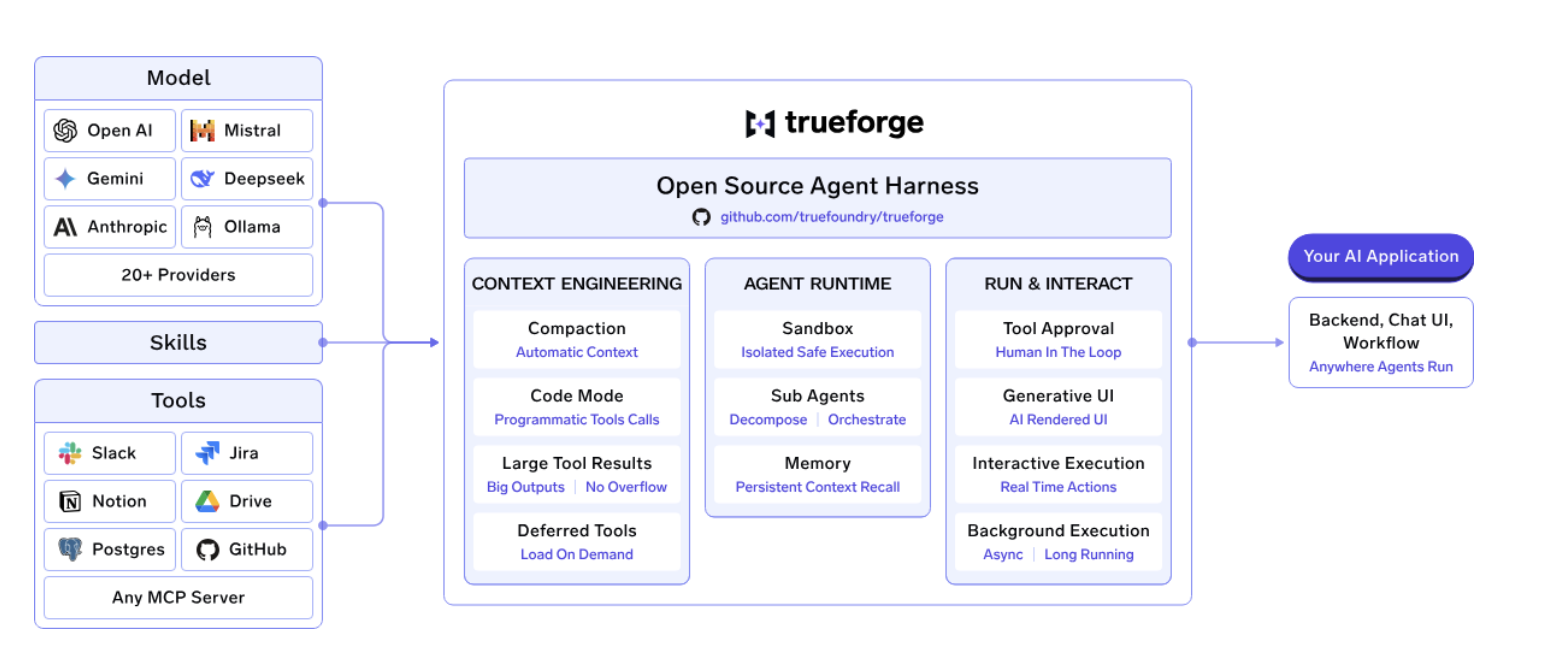
LangChain, LangGraph, and LangSmith cover different parts of the AI application stack: LangChain provides building blocks, LangGraph handles stateful agent orchestration, and LangSmith provides observability. TrueForge sits at a different layer: it is the runtime that actually runs the agent. It handles the loop around the model, including planning, tool calls, context management, sandboxing, approvals, and session state.
TrueForge is an open-source, vendor-neutral agent harness. It is split into a core server that runs the agent loop, an HTTP API with a TypeScript SDK for programmatic access, and a chat UI with a UI SDK that can be used as-is or embedded into your own application. You can run it locally with npx @truefoundry/trueforge, or deploy it for a team using Docker Compose or Helm.
The key difference is that TrueForge keeps the runtime separate from the model and tools. Model providers, MCP servers, and sandbox providers are all bring-your-own, so switching models does not require rebuilding the agent. TrueForge also treats the sandbox as a tool rather than running every agent inside one continuously. A sandbox is provisioned only when the agent needs to execute code, allowing one server to run multiple agents while keeping non-code turns lighter.
For teams moving beyond individual agents, TrueForge can also provide the operational layer around the runtime. When combined with TrueFoundry's AI Gateway, teams can add RBAC, budgets, guardrails, credential rotation, and unified traces across their agents and model usage.
So the distinction is straightforward: LangChain gives you components to build with, LangGraph gives you primitives to orchestrate agent workflows, LangSmith helps you see what those workflows are doing, and TrueForge gives you an open-source runtime for running the agent itself. If you're building agents that need to move from a local prototype to production, TrueForge is worth considering as the runtime layer underneath your agent stack.
LangChain, LangGraph, and LangSmith each solve a different part of the AI development lifecycle. LangChain helps you build LLM-powered applications, LangGraph enables stateful, multi-step AI agents, and LangSmith provides the observability needed to debug and monitor them in production.
Rather than replacing one another, they're designed to work together. By understanding the role of each tool, you can choose the right combination for your use case and build AI applications that are both scalable and production-ready.
What's the difference between LangChain, LangGraph, and LangSmith?
LangChain is a framework for chaining LLM calls and connecting to tools and data sources. LangGraph is the orchestration layer for agents that need to loop, branch, and hold state. LangSmith is the platform for tracing, evaluating, and optionally hosting agents built with either of the other two.
Do I need all three to build an agent?
No. A simple pipeline might only need LangChain. A stateful agent typically uses LangGraph, often alongside LangChain's integrations. LangSmith is optional but strongly recommended once an agent is doing anything beyond a quick prototype, since it's the main way to see what the agent actually did.
Is LangGraph replacing LangChain?
Not exactly. LangGraph changes how you structure the agent's execution loop, but LangGraph agents still commonly use LangChain's prompt and integration utilities. Think of it as an additional layer rather than a swap.
Does TrueFoundry support MCP and AI agents?
Yes. TrueFoundry includes an MCP Gateway, an Agent Gateway, and an MCP and Agents Registry with tool-level access control, so agents built on LangGraph, CrewAI, AutoGen, or custom frameworks can be deployed and governed through one control plane.
Does TrueFoundry integrate with my existing observability stack?
Yes. The platform is OpenTelemetry-compliant and plugs into Grafana, Datadog, Prometheus, or your existing stack, tracing each request from prompt through tool and model execution.
TrueFoundry AI Gateway delivers ~3–4 ms latency, handles 350+ RPS on 1 vCPU, scales horizontally with ease, and is production-ready, while LiteLLM suffers from high latency, struggles beyond moderate RPS, lacks built-in scaling, and is best for light or prototype workloads.






The latest news, articles, and resources sent to your inbox
.webp)

.webp)


.png)
.png)
.png)
.png)
.png)
.png)
.png)
.png)
.png)
.png)
.png)


