

What is Virtual MCP Server?
The Virtual MCP Server enables you to combine tools from multiple MCP servers into a single, curated MCP server that your application can connect to.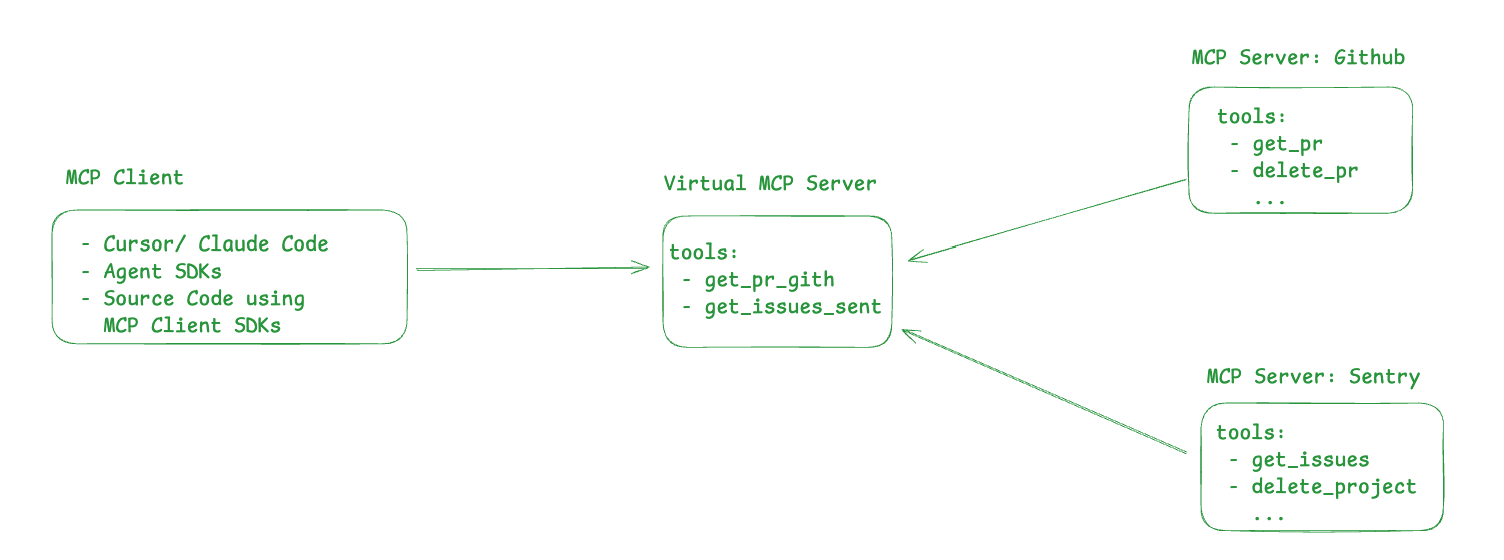
delete_project, delete_pr, etc.
As the name suggests, Virtual MCP Server allows you to create a new MCP server by taking a subset of safe tools from GitHub and Slack MCP servers. This new Virtual MCP server can be accessed like any other remote MCP server and does not require a deployment.
How to create a Virtual MCP Server?
Frequently Asked Questions
How do I pass through custom headers?
How do I pass through custom headers?
You can use
x-tfy-mcp-headers to pass custom headers, which will be passed to the remote MCP servers backing the virtual server.For MCP Gateway (direct MCP server access):Format note: The header format shown above is for MCP Gateway. If using the Agent API instead, use the full FQN-based format (e.g.,
truefoundry:mcp-server-group:remote-mcp-servers:mcp-server:server-name) documented in the Agent API authentication section.Does Virtual MCP Server require a new deployment?
Does Virtual MCP Server require a new deployment?
The Virtual MCP server is managed by the MCP Gateway and does not require a new deployment.
What MCP server features are supported by Virtual MCP Server?
What MCP server features are supported by Virtual MCP Server?
For now, only listing and calling tools are allowed.